
Salik is used in Dubai to collect tolls electronically. Toll booth drivers can move through toll lanes without stopping. The Salik account automatically deducted the toll fee. That is why it is vital to keep checking your balance on a regular basis. Salik balance check allows you to get an idea of the available credit in your account. It also allows for verifying recent recharges and toll deductions. Make it a habit to check your balance regularly to prevent low balances and travel without disruption.
Quick Facts About Salik
| Feature | Details |
| System Name | Salik |
| Operated By | Salik Company PJSC |
| Location | Dubai, United Arab Emirates |
| System Type | Electronic Toll Collection |
| Technology | RFID and ANPR |
| Official Website | salik.ae |
| Customer Service Number | 800 SALIK (72545) |
| Mobile App | Smart Salik App |
| Recharge Availability | Website, App, SMS, Banks, Kiosks |
| Account Access | Online and Mobile Platforms |
What Is Salik?
Salik is the barrier-free electronic toll system in Dubai. The Arabic word “Salik” translates to “clear” or “open”. Automatic toll collection takes place at a specific toll station, where tolls are deducted from the system.
The vehicles are identified, rather than at a toll booth, by Radio Frequency Identification (RFID) and Automatic Number Plate Recognition (ANPR) technology. This enables traffic to flow evenly on the main roads in Dubai.
Each registered vehicle will be connected to an account with a Salik tag. The account needs to have sufficient funds in it to pay for tolls when the vehicle enters a Salik gate.
Why Regular Salik Balance Monitoring Matters
Only a few drivers check their balance when they notice they are getting low on money. There are several advantages to regular monitoring, however:
- Don’t come up with a surprise of a low balance.
- Verify that accounts have been recharged.
- Accurately track tolls deducted.
- Monitor multiple registered vehicles.
- Look out for suspicious transactions.
- Minimize the chances of a penalty for accounts.
Regularly checking the status of the account is a hassle-free process for those who travel often to ensure that they can keep travelling in Dubai without any hassles.
How to Perform a Salik Balance Check Online
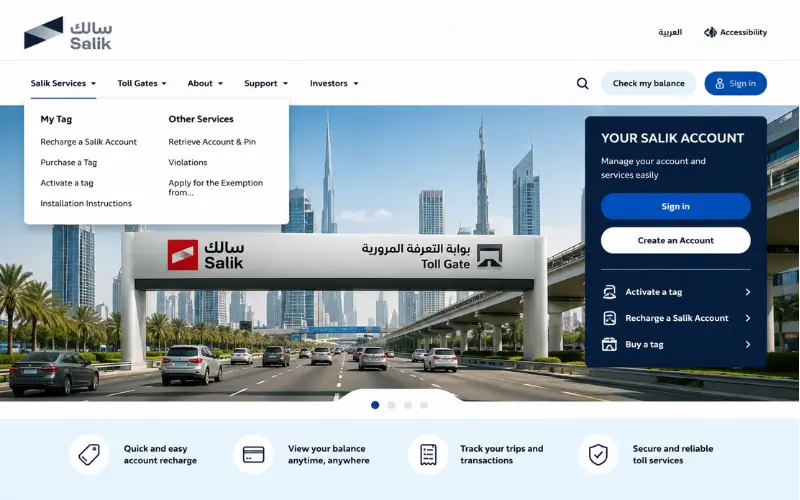
The website for the official Salik is the best and most dependable way to find out your account balance.
Using Your Salik Account
If you already have a username and password:
- Check out the Salik website.
- Log in to your account.
- Provide your username and password.
- Access your account dashboard.
- See your current balance and transaction history, vehicles, and recharge info.
This approach offers the most detailed information on accounts and lets them control multiple services from a single location.
Checking Balance Without Logging In
Balance information can also be made available via alternative verification offered by Salik.
In general, verification can be accomplished through:
- Registered mobile number
- Vehicle plate details
- Vehicle type information
- Security verification code
If the information has been verified, the system will show the available account balance.
Salik Balance Check Through the Smart Salik App
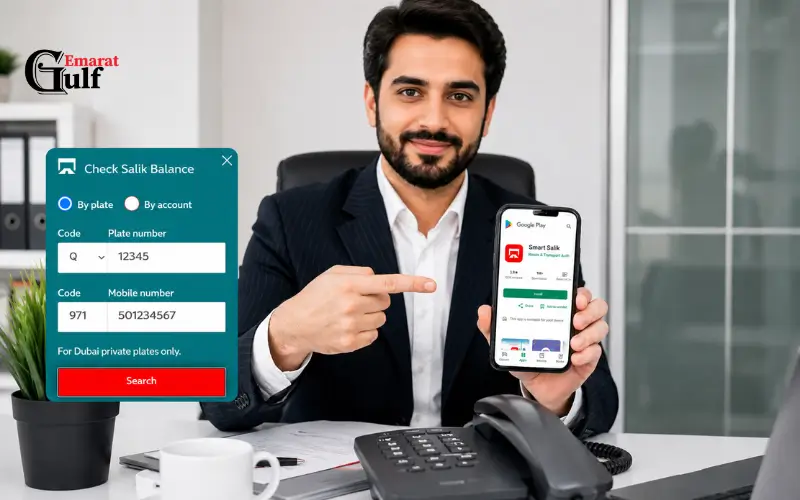
The Smart Salik App is among the most convenient account management tools.
Steps to Check Balance Using the App
- Install the Smart Salik Application.
- Use your account details to log in.
- Open the dashboard.
- View current balance information.
- View trip data and recharge.
The app also allows users to:
- Recharge accounts.
- Manage vehicles.
- Review toll transactions.
- Receive account notifications.
- Track account activity on a real-time basis.
The mobile app is the quickest way to check the driver’s balance for frequent users of Dubai roads.
Salik Balance Check Through the RTA Dubai App
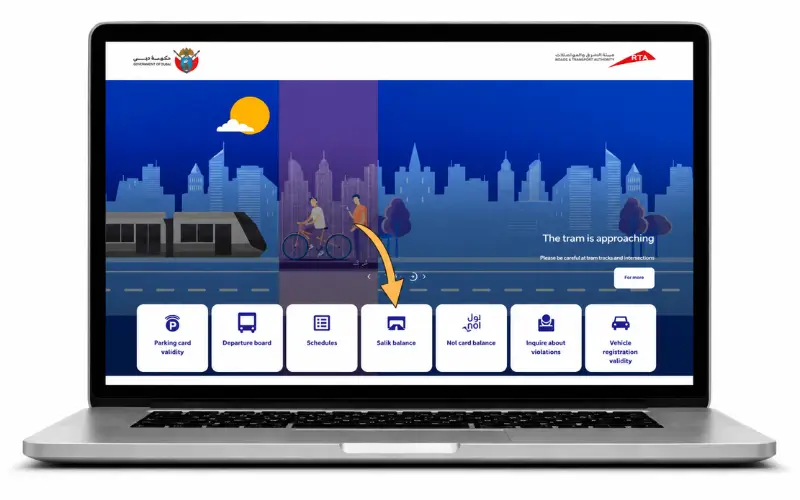
Integrated Salik is implemented by RTA via its Mobile platform.
How to Check Balance
- Download and install the RTA Dubai App.
- Log in to your account.
- Go to the Salik section.
- Fill in the necessary information for the account.
- Check your account and balance.
This is great for anyone who has several different transportation services and wants them all in one app.
Check Salik Balance by Phone
For those who are not interested in manual services, the official automated system is available for drivers.
Steps
- Call 800 SALIK (72545).
- Choose your preferred language.
- Choose account services.
- Please enter your Account Number and PIN.
- Listen to the automatic balance announcement.
This is helpful when you don’t have internet access or are in need of real-time account details.
Salik Balance Check Using Account Number and PIN
Many account holders choose to use their account number and PIN because it allows them to access their account information in a secure way.
These credentials can be used via:
- Official Salik website
- Smart Salik App
- RTA Dubai App
- Customer service telephone solution.
Users who are authenticated will then have access to:
- Current balance
- Transaction history
- Recharge records
- Registered vehicle information
- Account management services
This is still one of the safest methods of accessing a Salik account.
Salik Balance Check by Plate Number
Depending on the user, he or she might not be able to immediately access the account number.
If that is not possible, Salik offers other means of verification based on the information provided in the vehicle.
Generally, you may expect to have to provide:
- Registered mobile number
- Vehicle plate number
- Emirate registration details
- Vehicle category
Once verified, account information can be retrieved without logging into an account.
Understanding Your Salik Account Dashboard
When you log in to your account, there’s much more than just your account balance.
Key account details comprise:
| Dashboard Feature | Purpose |
| Current Balance | Available account credit |
| Toll Transactions | Recent toll deductions |
| Vehicle Information | Registered vehicle details |
| Recharge History | Previous top-ups |
| Violation Information | Related account notices |
| Auto Recharge Settings | Automatic funding configuration |
Such capabilities allow users to have full visibility of the activities related to their accounts.
How to Recharge Your Salik Account
Salik balance check is just one aspect of account management. It is also vital to recharge.
Online Recharge
Users can recharge using any of the following:
- Official Salik website
- Smart Salik App
- RTA Dubai App
- Dubai Now App
- Careem App
- TAMM Platform
Funds are normally posted right after the payment has been processed.
SMS Recharge
Salik also provides recharge service over SMS with the help of the user’s approved recharge cards and account credentials.
The recharge request needs to be in the format defined by Salik. The account balance will be automatically updated after confirmation.
Bank and Self-Service Recharge
Other recharge pathways are:
- Participating banks
- Self-service kiosks
- Customer happiness centers
- Selected ATMs
- Authorized recharge points
These are options for the users who do not wish to make transactions online.
Common Salik Balance Check Problems and Solutions
Unable to Log In
Possible causes include:
- Incorrect credentials
- Expired password
- Browser issues
Change your password or use the official account recovery features.
Balance Not Updating After Recharge
When a recharge is done, but the balance is not reflected immediately:
- Wait for processing.
- Verify payment confirmation.
- Check transaction records.
- If this problem still isn’t resolved, reach out to Salik support.
Forgotten Account Number or PIN
Users can retrieve their account information by using the official account retrieval service provided on the Salik platforms.
Mobile App Not Working
Possible fixes include:
- Updating the application.
- Clearing cache.
- Reinstalling the app.
- Verifying internet connectivity.
Salik Account Security Best Practices
Your account holds vehicle records and payment information, so it’s important to keep it protected.
Recommended practices include:
- Use strong passwords.
- Maintain confidentiality of PINs.
- Allow automatic recharges to be notified.
- Check your accounts periodically.
- Keep contact details up to date.
- Don’t share usernames or passwords.
These measures help to minimize unauthorized access to an account.
Benefits of Using Automatic Recharge
Automatic recharge is often turned on by frequent commuters.
Advantages include:
- Preventing low-balance situations.
- Minimising manual account management.
- Preventing uncollected toll reductions.
- Sustaining the continuous operation of accounts.
Official Salik account settings can be used to set up auto-recharge.
Salik and Dubai’s Smart Mobility Ecosystem
Salik has now become an integral part of Dubai’s transport network.
The system enables hassle-free movement through:
- Electronic toll collection
- Smart mobility initiatives
- Traffic flow optimization
- Digital transportation services
The network is deployed on Dubai’s roads through multiple automated toll gates, all of which are equipped with high-end RFID and ANPR technology, according to official Salik information.
Conclusion
A salik balance check is useful for maintaining an account and ensuring that you do not experience any travel disruptions in Dubai. You can view your Salik balance on the official Salik website, the Salik Smart App, the RTA Dubai App, or customer service. By monitoring accounts regularly, you can see any tolls that have been charged, verify any recharges, and ensure that you always have enough money in your account. Regularly monitoring your balance will ensure a seamless and hassle-free driving experience throughout Dubai’s toll road network.
Must Read: Etisalat Data Balance Check via SMS, App, and USSD Codes
Al Rostamani Balance Check by SMS, App, and ATM – Fastest Methods Explained
Ratibi FAB Balance Check – Online, ATM & SMS Methods Guide
Frequently Asked Questions
How can I perform a Salik balance check online?
You can use the official Salik website to log in to your account to check your balance, or use one of the vehicle verification methods.
Can I check my Salik balance without logging in?
Yes. Salik offers verification via registered mobile and vehicle information, depending on the service channel.
What is the Salik customer service number?
The customer service phone number is 800 SALIK or 800 (72545).
Can I check my Salik balance using the mobile app?
Yes. Smart Salik App enables users to see balances, transactions, and account details.
How do I recharge my Salik account?
Recharge can be made online, via mobile applications, SMS service, participating banks, kiosks, and other approved channels.
Can I check Salik’s balance by plate number?
Yes. Some methods of verification can be performed by looking up an account based on the registered vehicle plate or mobile number data.
What should I do if my balance does not update after recharging?
Check the payment confirmation, wait for the payment to be processed, and reach out to Salik customer support if the balance doesn’t change.